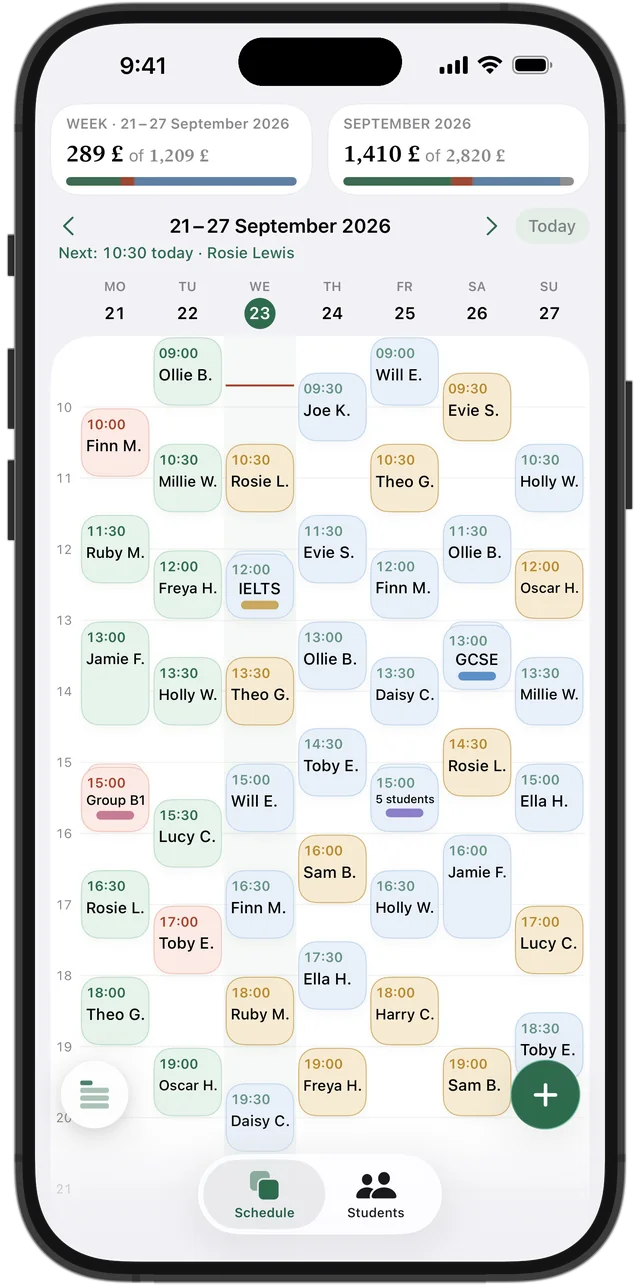
Weekly timetable
Your whole week as a grid or a list. A lesson's colour tells you at a glance whether it's paid, owed or prepaid. Tap a free hour to create a new lesson.
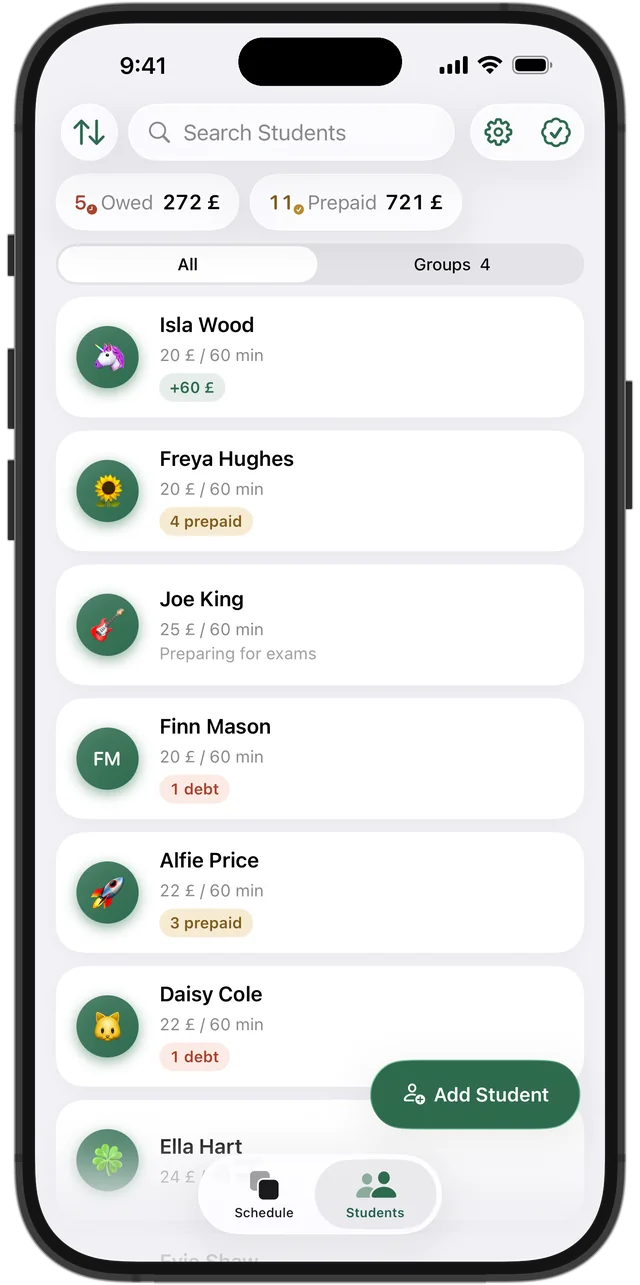
Students and payments
Every student has their own balance, so you see right away who's paid ahead and who owes you. Add funds to a balance, and lessons get paid for automatically, one after another. Every payment stays in the history, and the top of the screen always shows who owes and how much.
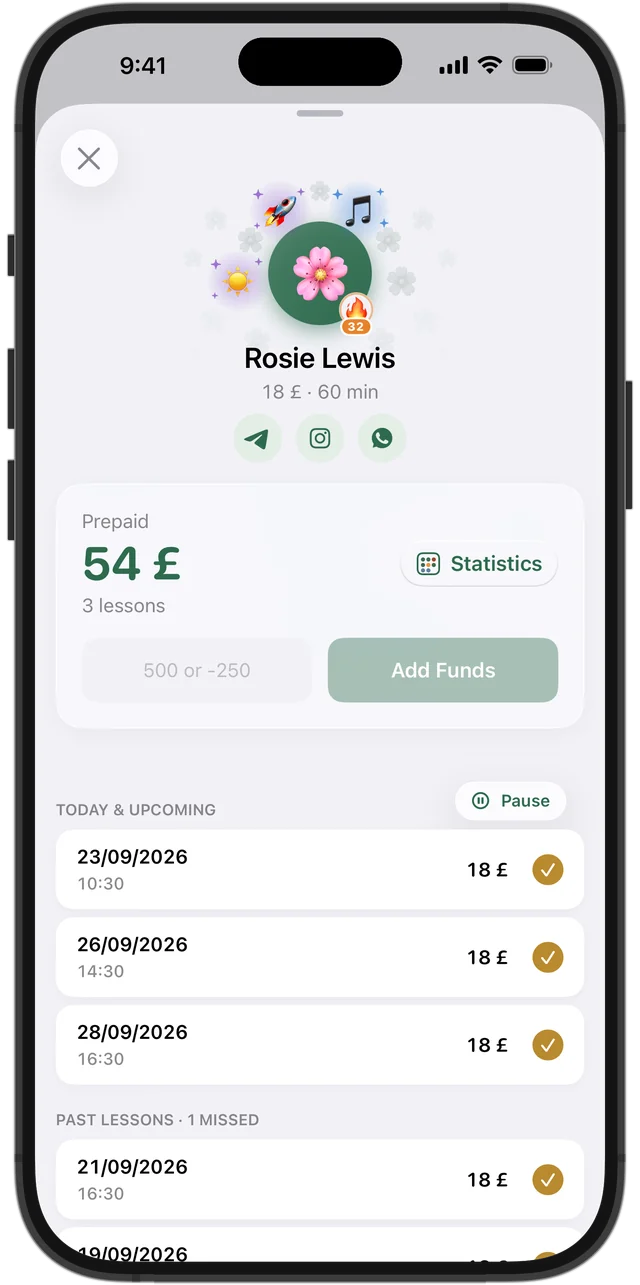
Student card with achievements
Balance, upcoming and past lessons, contacts on Telegram, Instagram or WhatsApp, and a note – all in one card. Next to the avatar: the student's achievements and a 🔥 streak if they haven't missed a lesson.
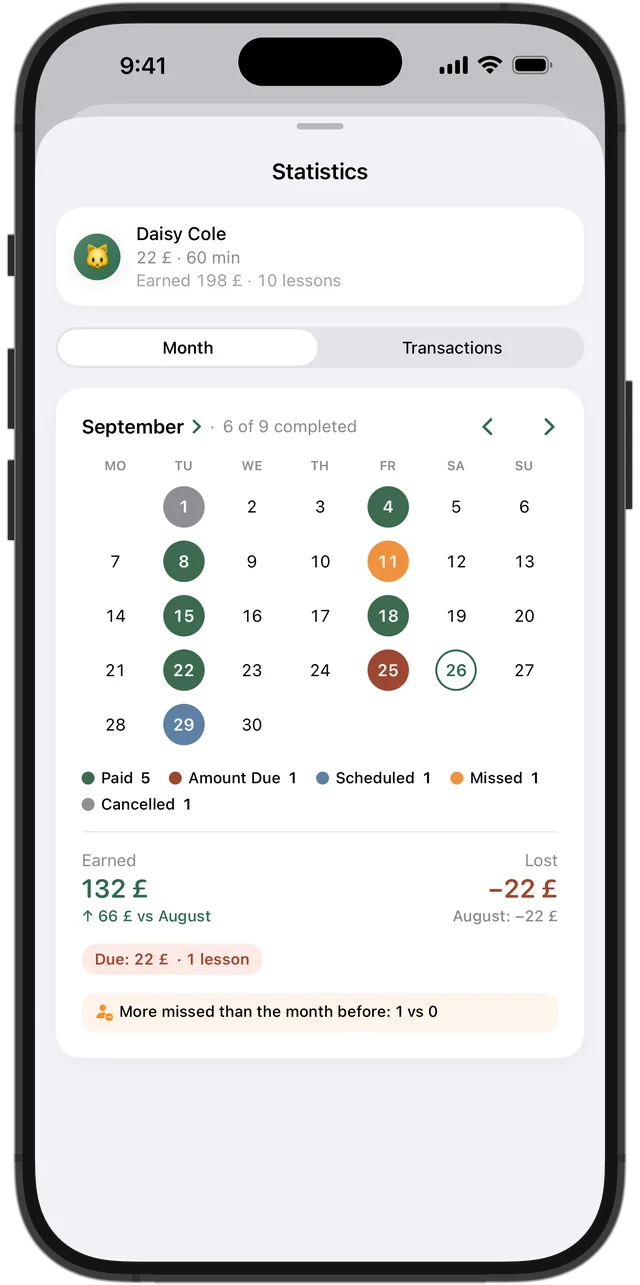
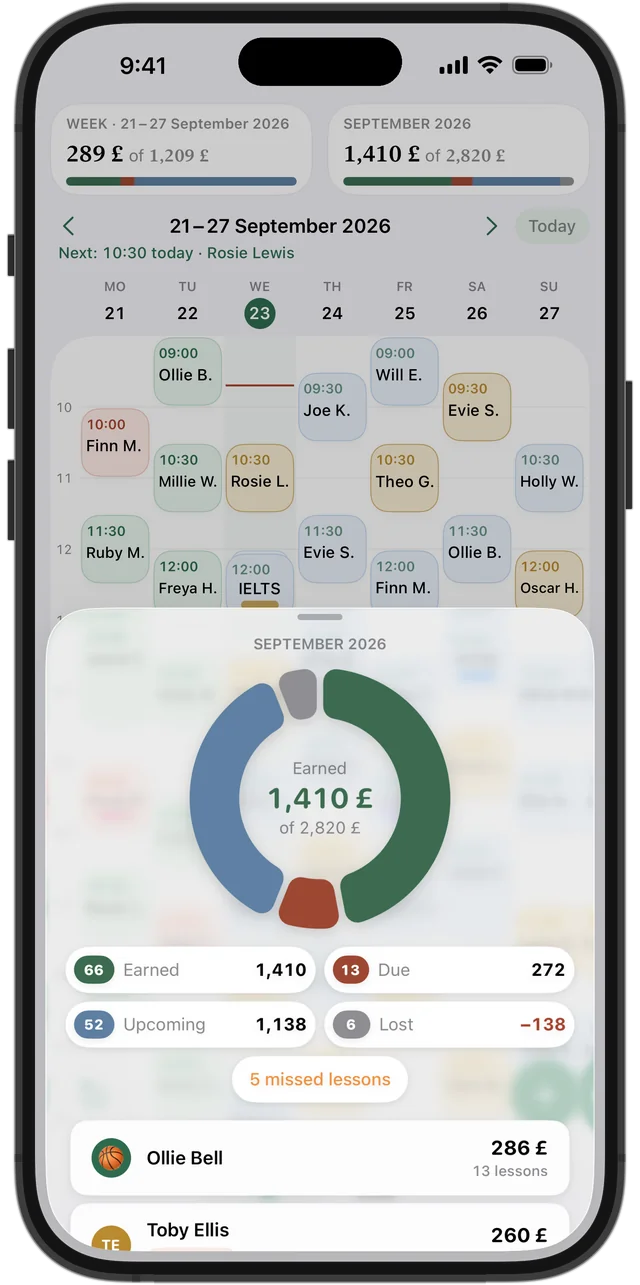
Statistics for every student
A month calendar with every lesson marked in colour. How many lessons were taught and missed, how much you've earned, what's still due and what was lost to cancellations – plus a comparison with last month.
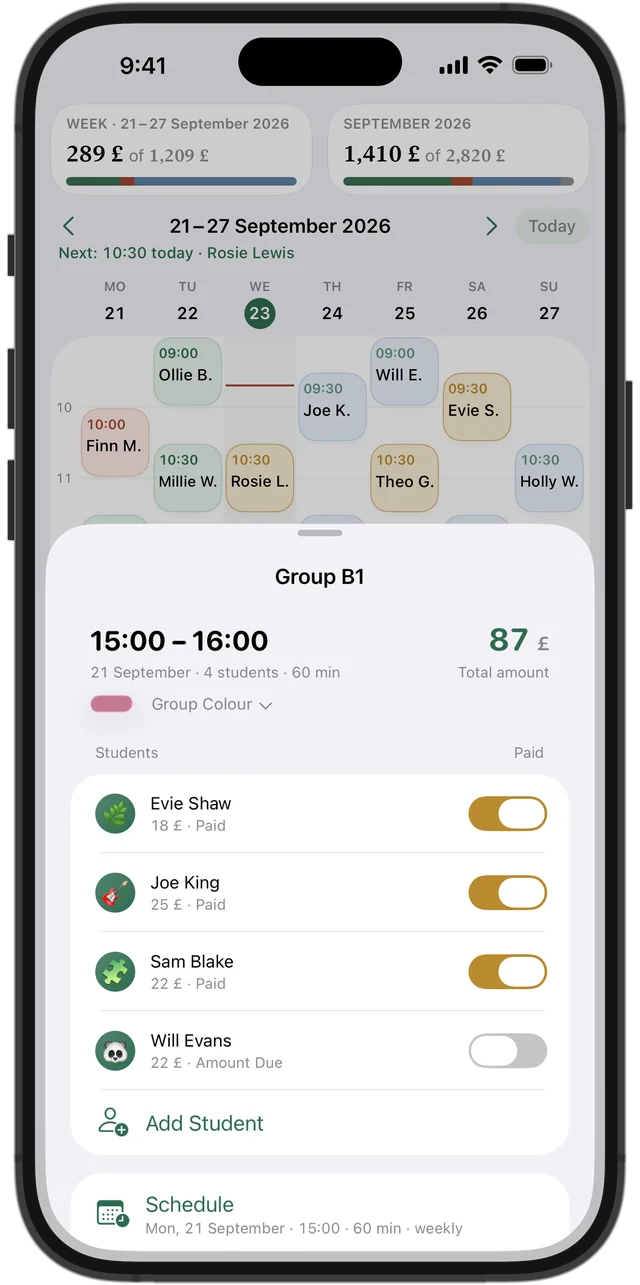
Group lessons
Put students into groups, each with their own price. Payments and missed lessons are tracked separately for every student, and you can reschedule or cancel for the whole group at once.
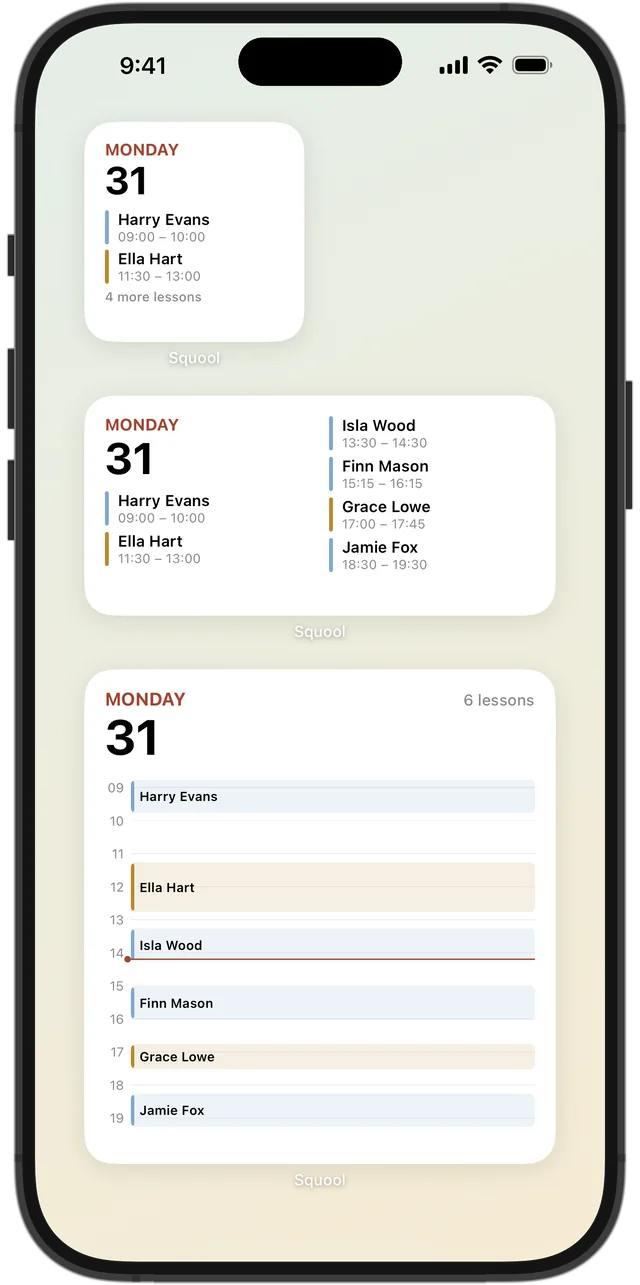
Widgets and Apple Watch
Your next lessons on the Home Screen, in three widget sizes. On Apple Watch, you can see which lesson is on now and what's next, and mark a missed lesson or cancel one with a single tap.
Works on all your devices
Start on iPhone, pick up on iPad or Mac. Your timetable, students and payments sync through your iCloud automatically – no sign-in, no passwords. And on Apple Watch: what's on now and what's next.
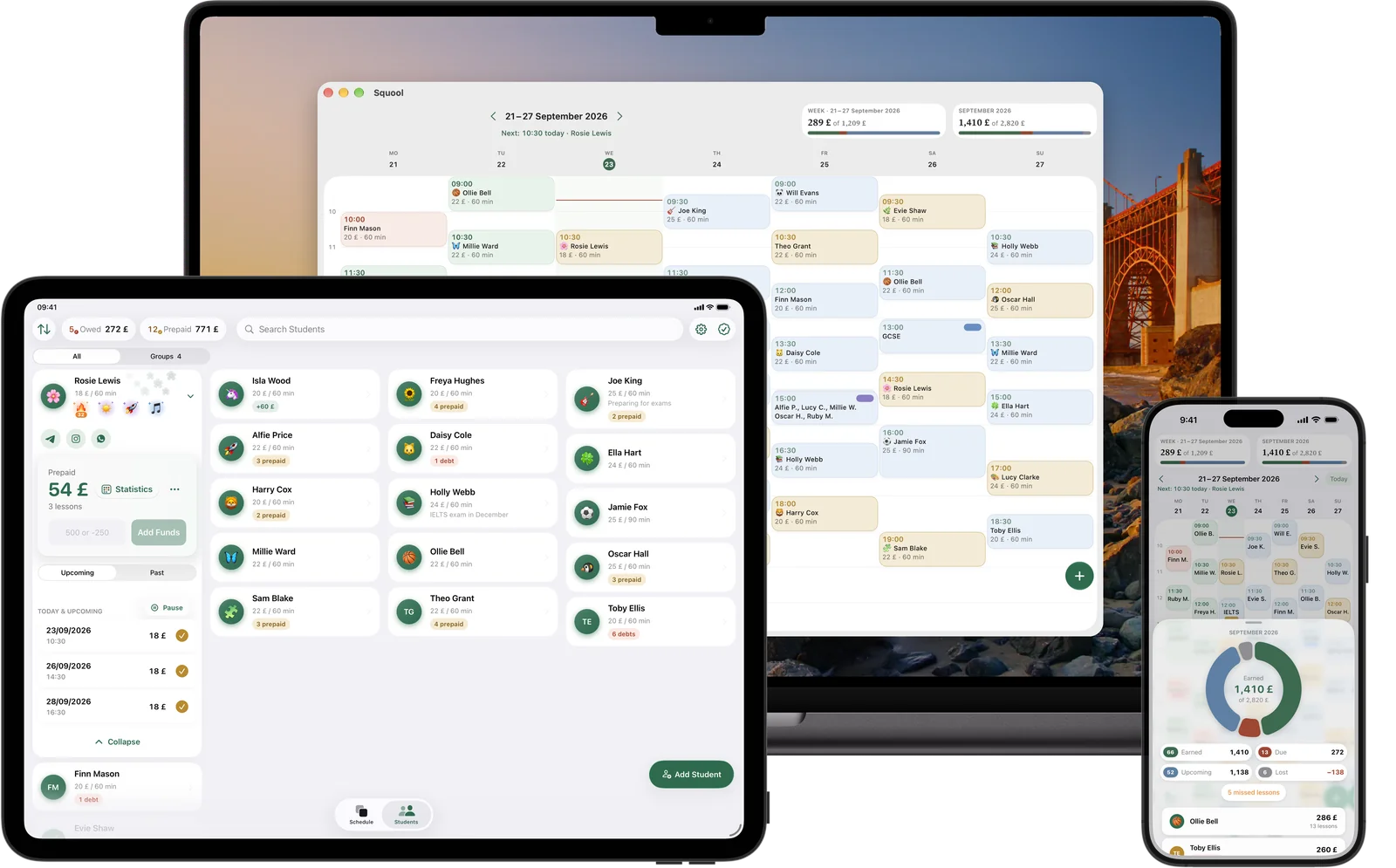
Also in Squool – on every device
Student achievements and streaks
The app notices your students' progress and gives them achievements on its own: ‘Every week’ when a student has a lesson every single week, ‘Like clockwork’ when they come on the same day and time for a month, ‘More often now’, ‘Iron discipline’ and more. The 🔥 streak next to the avatar lights up once a student goes a month without missing a lesson and shows how many days in a row it has lasted. You can see who your most dedicated students are – and you always have something to praise them for.
Import students from Google and Apple Calendar
Been keeping your timetable in Google or Apple Calendar? No need to enter everything by hand: Squool finds the lessons in your calendar and brings your students and recurring lessons into your timetable. You can start the import from an empty timetable or from Settings.
Sync with Google and Apple Calendar
Squool can sync your timetable with Google Calendar or Apple Calendar. Lessons show up there automatically and stay up to date when you move, cancel or add one. In Google Calendar, lessons are also colour-coded: paid, owed or prepaid. Turn it on with a single switch in Settings.
Reminders before lessons
Squool sends you a notification before each lesson starts: who it's with, what time, and how many minutes to go. For a group lesson, it's a single reminder with all the students' names. That way you won't miss a lesson, even on a packed day.
Holiday and pause
Going on holiday, or is a student taking a break? Set the holiday or pause dates, and the lessons on those days are cleared automatically – no need to reschedule each one by hand. Money a student paid in advance doesn't disappear: it goes towards their next lessons.
Recurring lessons
Create a regular lesson once and turn on ‘Repeat Weekly’ – from then on, it shows up in your timetable every week by itself. Moving a single lesson, changing the time for all future ones or ending the series takes just a few taps.
Your data stays yours
Your timetable, students and payments are stored on your device and in your personal iCloud. The developer has no access to them and can't see a thing. When you get a new iPhone, all your data comes back on its own.
Back up to a file
You can back up all your students, lessons and payments to a file – and restore your data from it at any time. On top of that, all your data is already kept on your device and in your iCloud.
Languages and currencies
English, French, German, Spanish, Polish, Ukrainian and Russian. Prices can be in pounds, euros, US dollars and other currencies – even a different one for each student.
Who it's for
For tutors, language and music teachers, coaches, GCSE and A-level prep – anyone who teaches private lessons and wants to see their timetable and money without spreadsheets and scattered notes.
By subject
Questions and answers
How much does Squool cost?
The first 14 days give you full access for free, no card needed. After that, it's a subscription for a month, 3 months or a year; you'll see the price in your currency on the App Store.
Which devices does it work on?
iPhone, iPad, Mac and Apple Watch. Your data syncs through your iCloud automatically.
Can I use it to track student payments?
Yes. Each student has their own balance: top-ups, lesson payments, debts and prepayments are all calculated automatically.
Can I import students from Google or Apple Calendar?
Yes. Squool finds the lessons in your calendar and brings your students and recurring lessons into your timetable – no manual entry.
Can I see my lessons in Google Calendar?
Yes. Turn on sync in Settings, and your timetable will appear in your Google or Apple Calendar and keep itself up to date.
What are achievements and streaks?
The app gives students achievements on its own – for consistency, progress and hard work. The 🔥 streak stays lit while a student keeps coming without missing a lesson and shows how many days in a row.
Can I run group lessons?
Yes. In a group, each student has their own price, and payments and missed lessons are tracked separately.
Can the developer see my data?
No. Your timetable, students and payments are stored on your device and in your iCloud.
Is Squool available on Android?
No, it's only for Apple devices.
How do I contact support?
In the app: Settings → ‘Contact Support’. The developer replies personally.
Guides
Practical answers to the questions every tutor runs into: who has paid, what to do about no-shows, how to plan a weekly timetable and how much you really earned this term. Each guide works on paper too – and shows how Squool handles it.
Try it free for 14 days
No card required. Subscribe only once the app has proven it's worth it to you.
Download on the App Store