What tutors use today, and what really matters
A paper notebook is quick and always at hand. Excel or Google Sheets can count anything once you build the formulas. The phone calendar reminds you where to be. Web services for tutors put everything in a browser, behind an account.
Whatever you use, the same questions come back every week: who owes you and who has paid ahead, how to avoid retyping the same weekly lessons, how to tell a missed lesson from a cancelled one, how much you earned this month, and who can see your students' data.
Squool next to the usual tools
 Squool | Paper notebook | Excel / Google Sheets | Phone calendar | |
|---|---|---|---|---|
| Weekly lessons set up once | Squoolyes, several weekdays, each own time | Paper notebookno, rewritten every week | Excel / Google Sheetscopy rows by hand | Phone calendarrepeating events, no prices |
| Prepaid balance pays lessons automatically, oldest first | Squoolyes, top-ups pay lessons in order | Paper notebookno | Excel / Google Sheetsformulas you build yourself | Phone calendarno |
| Who owes and who paid ahead, at a glance | Squoolyes, at the top of the list | Paper notebookby hand, page by page | Excel / Google Sheetsformulas by hand | Phone calendarno |
| Income: earned, due, upcoming, lost | Squoolyes, week and month, per student | Paper notebookcount by hand | Excel / Google Sheetsformulas by hand | Phone calendarno |
| Missed and cancelled lessons tracked separately | Squoolyes, missed is charged, cancelled refunded | Paper notebookby hand | Excel / Google Sheetsby hand | Phone calendarno |
| Group lessons with each student's own price | Squoolyes, payment and misses per student | Paper notebookby hand | Excel / Google Sheetsby hand | Phone calendarno |
| Students paying in different currencies | Squoolyes, totals in your base currency | Paper notebookconvert by hand | Excel / Google Sheetsformulas by hand | Phone calendarno |
| Moving students and lessons over from Apple or Google Calendar | Squoolyes, students and weekly lessons in minutes | Paper notebookno | Excel / Google Sheetsretype by hand | Phone calendaralready in the calendar |
| Schedule synced to Google and Apple Calendar | Squoolyes, events update when lessons change | Paper notebookno | Excel / Google Sheetsby hand | Phone calendarit is the calendar |
| Holiday and pause without moving lessons | Squoolyes, prepaid money moves to later lessons | Paper notebookby hand | Excel / Google Sheetsby hand | Phone calendardelete events by hand |
| Student achievements and streaks | Squoolyes, a 🔥 streak for lessons without misses and automatic awards for effort | Paper notebookno | Excel / Google Sheetsno | Phone calendarno |
| Where your data is stored | Squoolon your own device and in your iCloud, no account; the developer has no access | Paper notebookin the notebook, one copy | Excel / Google Sheetsin your file or cloud drive | Phone calendarin your calendar account |
Squool: features of the current version. Other columns: typical tools, not specific products.
Try it free for 14 days · No card required. Subscribe only once the app has proven it's worth it to you.
Download on the App Store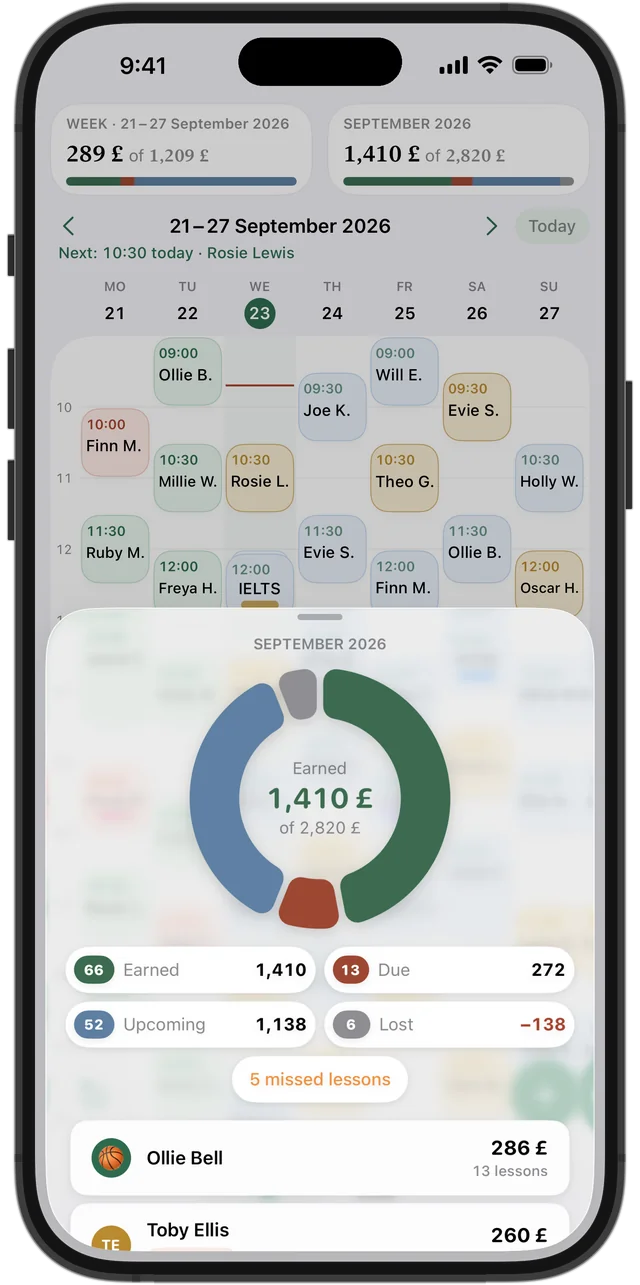
Why tutors choose Squool
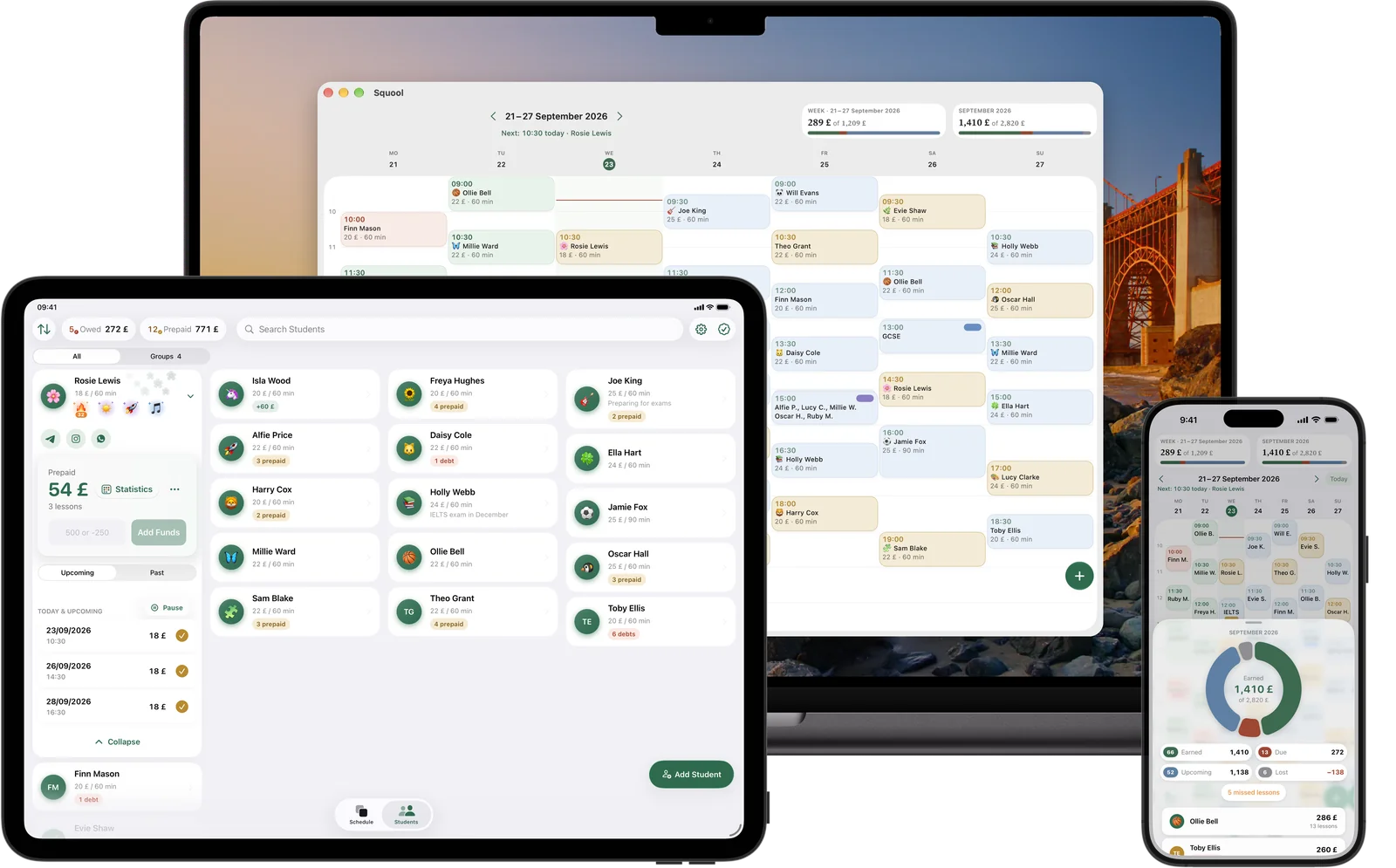
Squool is a native app for iPhone, iPad and Mac, built for one tutor working alone. It keeps the schedule, students and money in one place and does the counting for you.
- A parent pays for eight lessons ahead: the money goes to the balance and each lesson is paid automatically, oldest first.
- Lesson colours show the payment state at a glance: paid, owed, prepaid, upcoming.
- A missed lesson without notice is charged; a cancelled one returns the money to the balance and shows up as lost income.
- The earnings ring shows earned, due, upcoming and lost for the week and month, plus a month calendar for every student.
- Groups with their own price per student, students in different currencies, holiday and pause that keep prepayments.
- Reminders before each lesson, home screen widgets and Apple Watch; automatic awards for regular attendance and effort give you something to praise students for.
How to switch in one evening
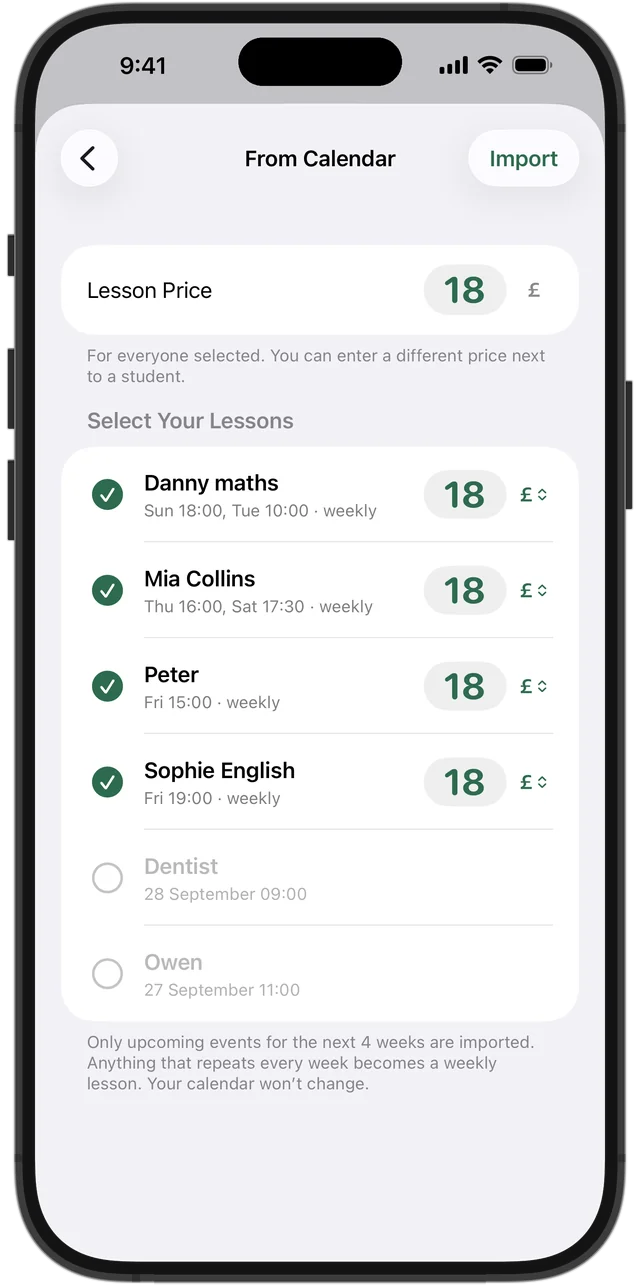
From the phone calendar: if your lessons already live in Google Calendar or Apple Calendar, Squool finds the weekly ones, turns them into students and recurring lessons, and you set a price. Our guide on importing from Google or Apple Calendar walks through it step by step. Your calendar can stay: Squool can sync the schedule back to it.
From paper or a spreadsheet: add your students with their price and lesson length, tap the free hours in the week grid to set up weekly lessons, then enter each student's current balance as a top-up. Twenty students take about an evening. There is no spreadsheet import, so keep the old file as an archive.
Not ready for an app? Start with our free tutor spreadsheet template, and move to Squool when the formulas start to feel like a second job.
Questions and answers
What is the best app for a private tutor?
For a tutor who works alone on iPhone, iPad or Mac, Squool covers the weekly work: recurring lessons, prepaid balances paid automatically, missed and cancelled lessons apart, and income at a glance.
Is there a tutor app without an account?
Yes. Squool has no account or sign-in: data stays on your device and syncs through your own iCloud, and the developer cannot see your students or amounts.
Can I keep using Google Calendar?
Yes. Squool can bring students and weekly lessons over from Google or Apple Calendar and then sync your schedule back, so lessons still appear in your calendar.
Is Squool free?
You get 14 days of full access free, with no card. After that it is a monthly, 3-month or yearly subscription, priced in your local currency in the App Store.
Does Squool work for a tutoring centre with several teachers?
No. Squool is for one teacher working alone; it has no multi-teacher accounts, parent portal, online payments or invoices.
Read also
Spreadsheet template
Free tutoring spreadsheet template for Excel, Numbers and Google Sheets: students, lessons, payments and self-updating balances. Plus an income calculator.
Spreadsheet or app
An honest comparison for UK tutors: when a paper diary, Excel or a Google Sheets tracker is enough, which columns it needs, and when a tutoring app saves time.
Calendar import & sync
How tutors can move students and weekly lessons from Google or Apple Calendar into a lesson app, and sync the timetable back with colour-coded payments.
Tracking payments
A simple way for UK tutors to track payments: one balance per student, prepaid blocks and termly fees, who owes you and how much. Paper, Excel or an app.
Try it free for 14 days
No card required. Subscribe only once the app has proven it's worth it to you.
Download on the App Store